Relationship Chart Maker
Map your characters and show how each one feels about the others. Export a clear image of your cast.
Watch your character chart come to life.
Your story starts here.
Add your first character, or choose a starting point.
Select a character or connection to edit.
Bring your cast together.
Start with a character, or try a template.
Original templates
Nine original templates are part of the chart: My OC × the Cast, Ships & Love Triangle, Story Cast / Factions, Character Relationship Map, Relationship Web, D&D NPC Chart, Novel Character Map, Circus Cast Chart, and Survivor Cast Chart.
My OC × the Cast
Your original character sits in the center. The cast stands around them, with a label in each direction.
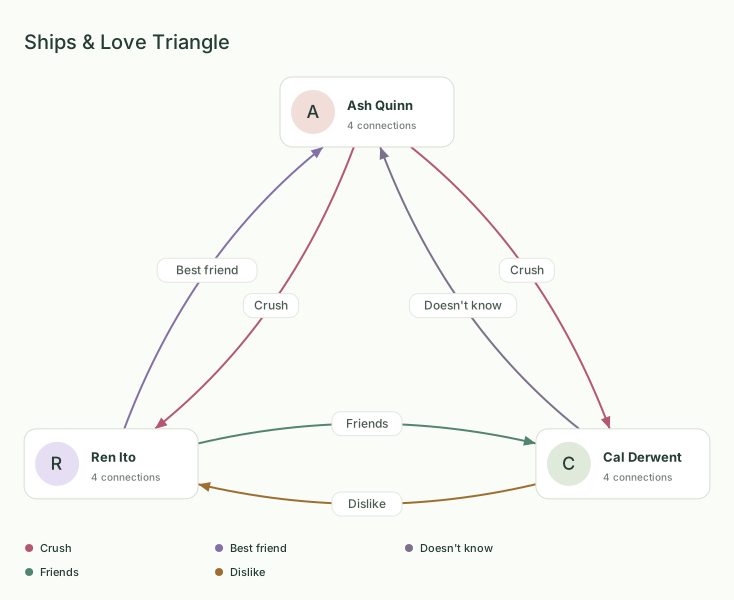
oc relationship chartShips & Love Triangle
Three original people, and a different label for each direction of a ship.
ship chartStory Cast / Factions
Two original groups, and the people who stand between them.
character relationship chartCharacter Relationship Map
Three original groups, and arrows that cross from one group to another.
character relationship mapRelationship Web
One person in the middle, with the rest of the cast tied to them and to each other.
relationship webD&D NPC Chart
Four player characters between two NPC factions, with one label on every arrow.
dnd npc relationship chartNovel Character Map
One household and one rival group, with family inside each side and a rivalry, a debt, and a secret across the gap.
novel character mapCircus Cast Chart
One performer in the middle of a circus cast, with rivals, crushes, and the person who runs the show.
tadc relationship chartSurvivor Cast Chart
One survivor in the middle of a hostile cast, with trust, rivalry, a debt, and a secret on the outer ring.
forsaken relationship chart
How the arrows work
Each arrow is one direction: it shows how one character sees another. The opposite direction is a second relationship with its own label. A one-way relationship is that single arrow. A two-way relationship is two arrows between the same people, and the labels can match or differ.
For every step from a blank canvas to a finished PNG, read how to make a character relationship chart.
Questions
- Is it free?
- Drawing the chart and exporting PNG or SVG are free. There is no account. Video downloads cost $8 once (tax included) and unlock MP4 downloads in this browser. See Pricing.
- Do I need to sign up?
- No. There is no sign-up. The chart is stored only in this browser.
- Is there a watermark?
- No. PNG and SVG exports have no watermark, and you don't need an account.
- Can I export my chart as SVG?
- Yes. Open Export and choose Download SVG. You get a vector file you can scale for print or edit in Figma, Inkscape or Illustrator, with no watermark.
- Where is my chart saved?
- The chart is saved in this browser. Clearing site data removes it, and Safari may clear unused site storage. Download a project file if you want a copy you can import later. The Order ID and receipt email unlock video downloads again through Restore purchase.
- Can I use it on my phone?
- You can view the chart on a phone. Adding a character and a relationship uses the same controls as on a desktop. Drag a character by pressing and holding the card, then moving it.
- How do I show a one-way relationship?
- To show a one-way relationship, select the character the arrow starts from, click Connect, then click or choose the character it points to. Choose a relationship label, then click Add connection. The arrow shows how the first sees the second. Add the reverse with Add [name]'s side, using that character's name; it is a separate relationship with its own label. The From and To menus in the Connect panel also work.
- Can I write notes on a relationship line?
- Each arrow holds one label: a preset such as Trust or Rival, or your own words up to 100 characters. The label is drawn on the line and stays in PNG and SVG exports. An arrow has no separate notes field. Put longer notes, such as backstory, a secret, or what changed in chapter 12, in the Character note box on a character card. Card notes are saved in this browser and in the project file. They are not drawn on the exported image.
What is a relationship chart
A relationship chart is a small cast drawn as cards. Each arrow points one way and carries one label, such as Trust, Crush, or Rival. You drag the cards into place, and RelationCanvas stores the chart in this browser.
Relationship charts for OCs, novels and TTRPGs
Use it for an original character, a novel cast, or a TTRPG party. Place one OC among the people around them, or lay the cast out in groups. Label how each person sees the others. Open a template when you want a cast already drawn, or start from a blank chart.
Character chart tools compared
Sources
- Steven R. Southard on separate lines between two characters. Checked October 19, 2026.
- Comparison of chart makers, with sign-up, export, and price checked October 19, 2026.