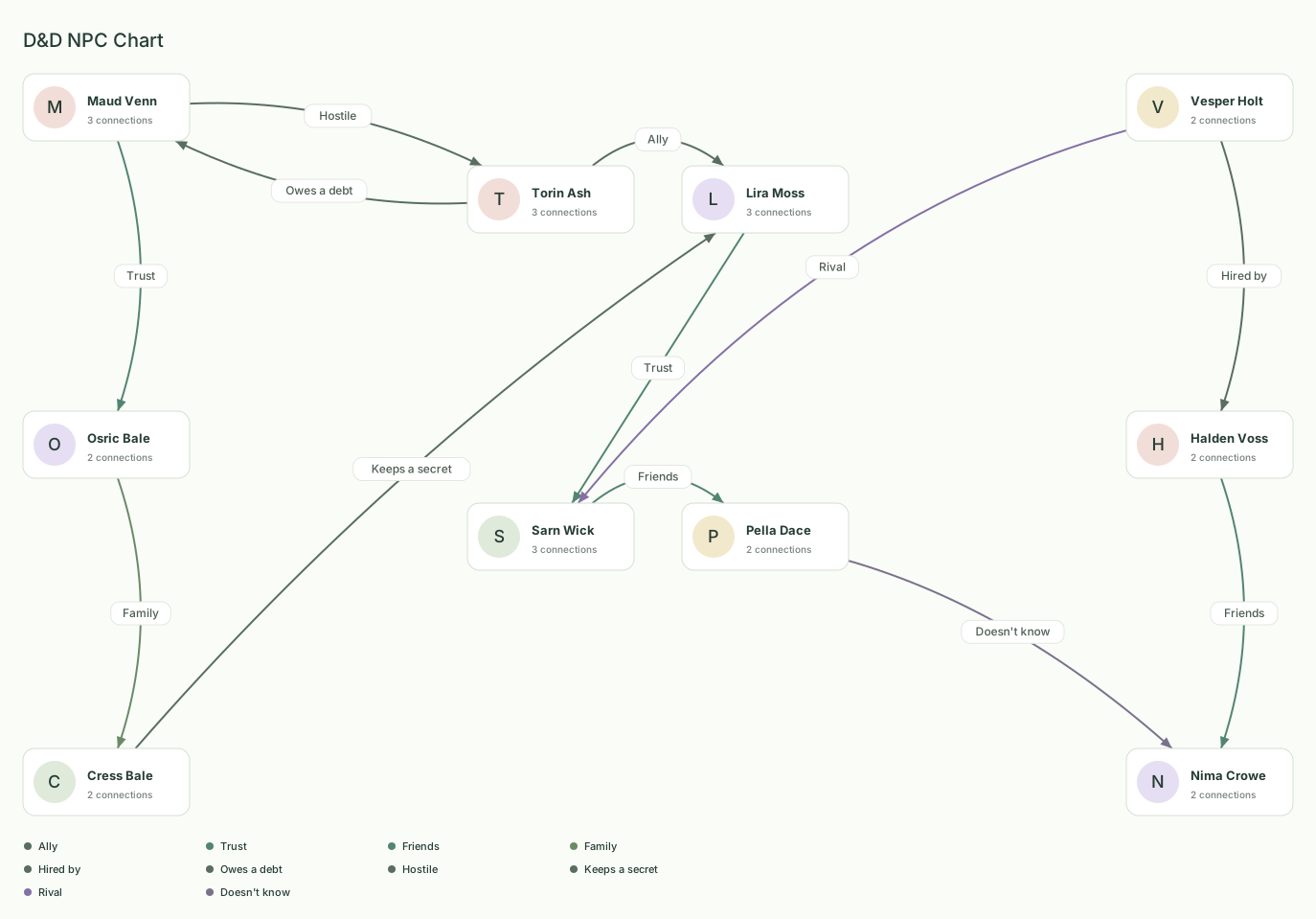
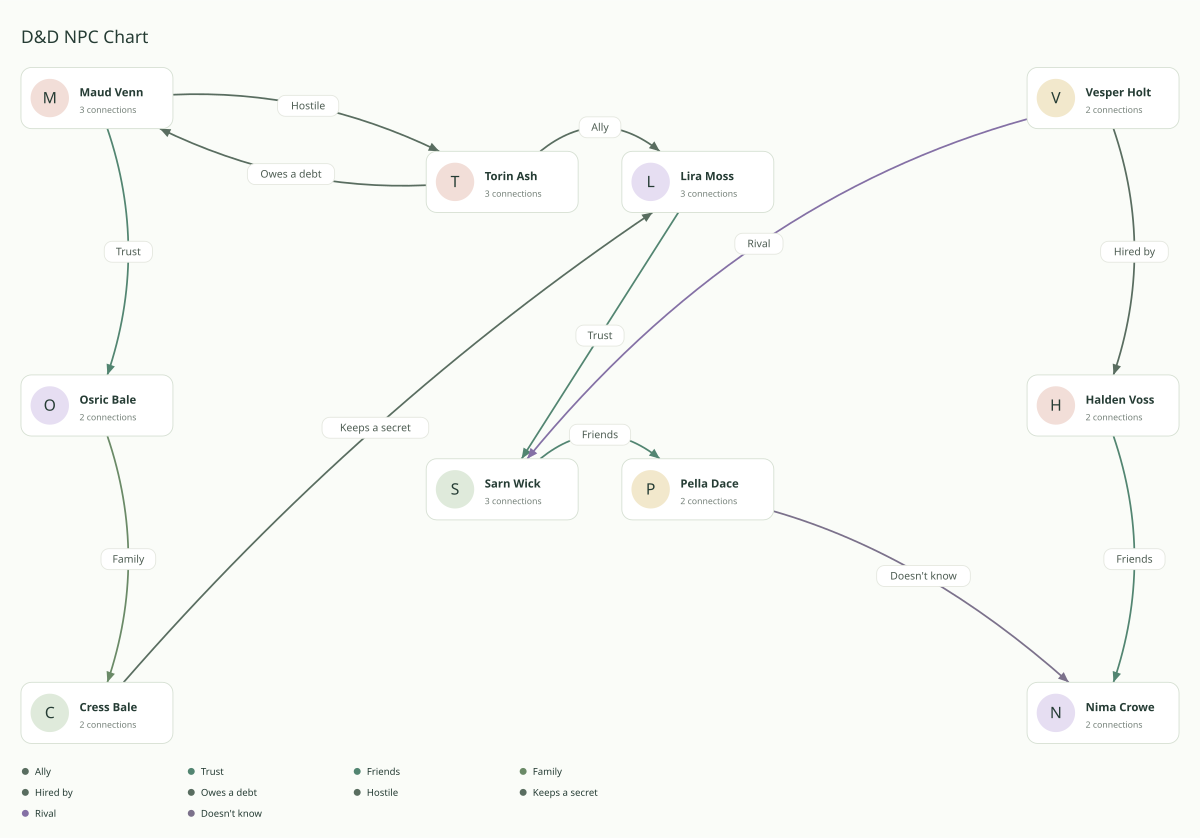
A D&D NPC relationship chart puts your party, the NPCs, and the factions they answer to on one page. This D&D relationship chart has four player characters in the middle, three harbor-guild NPCs on the left, and three crown NPCs on the right. Each arrow is one direction and one label, so an alliance and a hostile reply can both be true. Open the chart, rename the cards for your table, and keep a separate copy for anything the players should not see.
What's in this template
Ten cards, twelve arrows. Torin Ash and Lira Moss stand in the upper middle. Sarn Wick and Pella Dace stand below them. Those four are the party. Maud Venn, Osric Bale, and Cress Bale stand on the left. They are the harbor guild. Vesper Holt, Halden Voss, and Nima Crowe stand on the right. They are the crown. The file does not store a faction name. The camps are the clusters you see, and you drag a card into another cluster when that person changes sides.
Inside the party, Torin is an ally to Lira, Lira trusts Sarn, and Sarn counts Pella as a friend. Inside the guild, Maud trusts Osric, and Osric calls Cress family. Inside the crown, Vesper hired Halden, and Halden counts Nima as a friend. The other five arrows cross the gaps. Torin owes a debt to Maud, and Maud is hostile to Torin. Cress keeps a secret from Lira. Vesper sees Sarn as a rival. Pella does not know Nima. This D&D relationship map is that picture, ready to rename.
How each D&D arrow reads
Ally is Torin's arrow to Lira Moss. The label is the word Ally, written for this chart rather than picked from the preset list. It means Torin would stand with Lira in a fight, share a watch, or vouch for her with an NPC. It does not say what Lira would do for Torin. Her answer is the next arrow, and it uses a different word. Use Ally when the party bond is practical loyalty and Best friend, Friends, or Trust would be the wrong claim.
Trust, Friends, and Family are the other bonds that hold a group together on this chart. Lira trusts Sarn Wick, so Lira would tell Sarn the plan. Sarn counts Pella Dace as a friend, which is the bond Sarn would say out loud. Maud Venn trusts Osric Bale inside the guild. Osric calls Cress Bale family, so the guild is not only a payroll. Halden Voss counts Nima Crowe as a friend inside the crown. None of those arrows is copied onto the return. Add the other person's side only when you know it.
Hired by is Vesper Holt's arrow to Halden Voss. The phrase means Halden works for Vesper: a sellsword, a clerk, a spy on a purse. Employment is not loyalty. Halden can take the coin and still have his own arrow later, to Nima or to someone in the party. If the job ends, click the arrow and replace Hired by. A custom label stays readable at two or three words. The field accepts up to one hundred characters, and a sentence on the line is hard to read once you export.
Owes a debt is Torin's arrow to Maud Venn. The debt can be coin, a favor, or a life saved in an earlier session. The arrow points at Maud, so the guild has a hold on a player character without every party member owing the same thing. Maud's reply is not gratitude. There is a separate arrow for that. Leave a debt as its own label when paying it, or refusing it, would change a session.
Hostile is Maud's arrow back to Torin. The word is Hostile, not the preset Dislike, because a faction's answer to a debt is often a threat rather than a personal grudge. Maud can still take Torin's money and still want him gone. Rival is the other hostile shape on this chart: Vesper sees Sarn Wick as a rival, a competitor with a face, not an enemy of the whole party. Point hostility at the person the scene is about. Add more Dislike or Hostile arrows only when those extra pairs would change the night.
Keeps a secret is Cress Bale's arrow to Lira Moss. Cress knows something Lira does not, and the arrow says so. The secret can be a guild order, a family tie, or a clause in the debt. It is a label on the line, so anyone who can see this chart can see that a secret exists. The words of the secret, if they are long, belong in the Character note on Cress's card. That note is saved with the chart. It is not drawn on the exported PNG. It is still part of a project file and of a share link, so a note is not a private layer you can send to the table.
Doesn't know is Pella's arrow to Nima Crowe. Pella has no reading of Nima yet. It is not friendship and it is not hostility. Use it when an NPC has been named and the party has not formed a view, or when one player character has not met a person the others already know. When the session supplies a view, replace Doesn't know. Leaving it in place after the meeting hides the update you meant to record.
Read the twelve labels as three clusters and five crossings. The party is ally, trust, and friends. The guild is trust and family. The crown is a hire and a friend. Across the gaps sit a debt, a hostile reply, a secret, a rivalry, and a doesn't know. If your table drops one of those, delete the arrow. If it needs a reply this example skipped, draw it. A D&D relationship chart maker session is that edit: the cards and arrows are already here.
Who it's for
Dungeon masters use this before a session, when the party is about to walk into a faction and last session's attitudes are no longer in anyone's notes. Players use it to remember which NPC is an ally, which one is hostile, and which name was only heard once. For a single night, an RPG relationship map can stay at these ten cards: rename the party, delete the camp the one-shot will not reach, and export before you sit down.
It is the wrong first chart when the project is a novel with households, or when one original character stands in the center and everyone else exists only in relation to that person. Those have their own templates. Come here when the table has player characters and NPCs, and the factions are part of the question. A net of NPCs around one patron, with no party in the middle, is the relationship web. Two courts and one person standing in the gap, with no players to seat, fit the story cast template.
Tracking NPC attitudes between sessions
Treat the chart as a TTRPG relationship tracker you update after the session, not as a poster you finish once. Open the same chart, find the arrows the night actually changed, and edit those. A truce is a Hostile or Rival label you replace. A new debt is a new arrow, or an old Friends label you rewrite as Owes a debt. An NPC who finally noticed the party replaces Doesn't know. Leave every other arrow where it was. If you redraw the whole camp, you lose the record of what did not change.
Write the session's longer facts in a Character note: the price Maud named, the secret Cress almost told, the town the party promised to visit. Notes are saved in this browser and in the project file. They are not drawn on the PNG, so the picture stays a chart of labels. Between sessions, Download project file from the File menu. That file is the backup if the browser data is cleared before next game. Import project reads it back and does not replace the open chart until you confirm.
Party backstory links
The four party cards are already tied, and the ties do not match. Torin claims Lira as an ally. Lira trusts Sarn. Sarn calls Pella a friend. Nobody in that chain has answered. Backstory is the place those answers get written. If Lira does not want Torin's loyalty, add her side and label it. If Sarn and Pella grew up in the same company, Friends may be too thin, and Best friend or Family may be the word the players would actually say. Click the arrow that is wrong. Do not add a second arrow on top of it.
A backstory that reaches an NPC is a crossing, not a party arrow. Torin's debt to Maud is that kind of link: a player character arrives already obligated to someone at the table's edge. Give each player one such arrow at most on the first pass. A party where everyone owes everyone in both factions is a knot, and the picture stops telling you who would bargain. Add the second tie when a later session earns it. The same Connect control that drew the example arrows draws the new one: select the character, click Connect, and click the person the arrow points to.
A player chart and a DM chart
You cannot hide one arrow and still share or export the rest of the same chart. The open chart is a single picture. Export draws every arrow that is still on it. Share link carries those same arrows, and it also carries character notes. There is no control that drops a selected line from the PNG, or from the link, while leaving the line on the chart you are editing. Putting the secret only in a Character note keeps it off the PNG and does not keep it out of a share link or a project file.
Make two charts. Finish the DM version with the secret arrows in place. Cress Bale's Keeps a secret toward Lira Moss is the hidden line in the example, and yours may be a debt or a hire the table has not learned. From the File menu, choose Download project file and keep that file as the DM copy. Then select each secret arrow and choose Delete connection. On a phone the control is Delete relationship. The chart on screen is now the player version. Download a second project file for that version. Share the player version with Share link when the chart fits in a link, or click Export and then Download PNG. Share link is read-only. Anyone with the link can open it, so send the player file, not the DM file.
The browser stores only the chart that is open. To work on the secrets again, choose Import project and pick the DM file. Import does not replace the open chart until you confirm, so you can cancel if the player version is the one you still need on screen. Two files are the two versions. Deleting a connection is not a hide switch you can turn back on inside one chart, though Undo restores a deletion you just made.
How to make your own in 3 steps
- Rename the party, then the NPCs. Open the template and click Torin Ash, Lira Moss, Sarn Wick, and Pella Dace. Change the names to your player characters. Then rename Maud Venn, Osric Bale, Cress Bale, Vesper Holt, Halden Voss, and Nima Crowe, or delete a card you do not need and add someone with + Character. Put a short camp note on the card of whoever holds each faction together.
- Rewrite the labels the table would recognize. The twelve arrows are already drawn. Click an arrow and choose a preset, or replace Ally, Hired by, Owes a debt, Hostile, or Keeps a secret with your own short words. One direction holds one label. Do not add a second arrow in a direction that already has one. Add a missing reply with Add [name]'s side, or tick Also add their perspective while you connect.
- Save the DM copy before you make the player copy. Choose Download project file from the File menu while the secret arrows are still on the chart. Delete the arrows the players must not see, then Download PNG or make a Share link from the chart that remains. Import project brings the DM file back when you confirm.
The chart on screen is the one saved in this browser. A project file is the copy you can keep for the other version, including on another device. Drag the party away from the two camps before you export if a label sits on a card. The export uses the positions you leave.
Building the chart from an empty canvas instead? The step-by-step guide covers adding characters, labeling each direction, and exporting a PNG.
Questions about this party and NPC chart
- How do I map a D&D party and the NPCs around it?
- Open this template. Rename the four middle cards to the player characters and the six outer cards to the NPCs, or delete a card and add one with + Character. The left cluster and the right cluster are the two factions. Click an arrow to change its label. Drag a card into the other cluster when that person changes sides. The chart does not keep a separate faction field. The picture after you drag is the camp.
- What should I label on a party and NPC chart?
- Use a short label for the fact a scene would turn on. This example uses Ally, Trust, Friends, and Family inside a group, and Hired by, Owes a debt, Hostile, Keeps a secret, Rival, and Doesn't know where the groups meet. You can pick a preset or write your own words. Put a longer note, such as the terms of the debt, on the character card. The note is not drawn on the PNG.
- How do I give the players a chart that leaves the secrets out?
- Make two charts. Download project file while the secret arrows are still there, and keep that file as the DM copy. Then delete those connections. The open chart is the player version. Download PNG or use Share link for the table, and download a second project file if you want to keep the player version too. Import the DM file when you need the secrets back. Import waits for you to confirm before it replaces the chart on screen.